Diet type, restrictions and dislikes are different
A diet type is a broad preference about the meals you want to see. An allergy or restriction is information to check against ingredients and products. A dislike is a food you would rather avoid. Keep these three lists separate when recording your settings so the next app does not treat an essential restriction as an optional preference.
Mealime’s diet-type help page places the controls under Settings and Eating preferences. It says changes take effect when creating a new meal plan. The article is older documentation, so its labels may differ from your installed version.
Choose the setting that matches your cooking
The documented diet names include Classic, Flexitarian, Low Carb, Pescetarian, Vegetarian, Paleo, Keto and Vegan. Use the current controls to inspect what a selection includes; the older help page is inconsistent about the number of available options. A familiar label alone does not explain every ingredient the planner will suggest.
For a mixed household, record which requirements apply to everybody and which belong to an individual. A shared dinner may need one recipe that works for all eaters, while separate lunches can follow different preferences. Decide that arrangement before adjusting settings so you know what outcome to check in the next plan.
Make a preference record you can read anywhere
Write down the diet type you selected, each restriction and the foods you routinely exclude. Add the usual serving count and any notes about individual household members. Use clear ingredient names rather than a screenshot alone when a label is hard to read.
For example, a household might record vegetarian meals, no mushrooms by preference, and two portions at dinner. If there is an allergy, record it separately and keep the person’s established guidance. Do not group every excluded food under the single heading “dislikes”; that loses the reason for the exclusion.
A filter does not check the product in your basket
Mealime’s allergen-warning documentation explains that different versions of an ingredient may contain different allergens. Its grocery warnings are a prompt to inspect the product. A generic recipe title or an app badge cannot establish what is in the packet you buy.
Check ingredient labels and any relevant cross-contact information for the actual product. If you substitute a sauce, seasoning mix or meat alternative, check the substitute too. For personal allergy management, follow the guidance of the clinician or allergy service supporting you; this page is about preserving app settings, not choosing a medical diet.
Test settings with a fresh plan
After entering your preferences in a replacement, generate or build a small new plan. Open each recipe and inspect the ingredient list rather than judging only the meal photograph. Check any garnishes and optional ingredients, which are easy to miss when scanning.
If a recipe does not fit, remove it and inspect the setting that should have affected the suggestion. Do not assume an imported recipe automatically inherits every filter applied to the app’s own catalogue. Public links may carry recipe text but not your private preferences.
Bringing preferences into MealPot
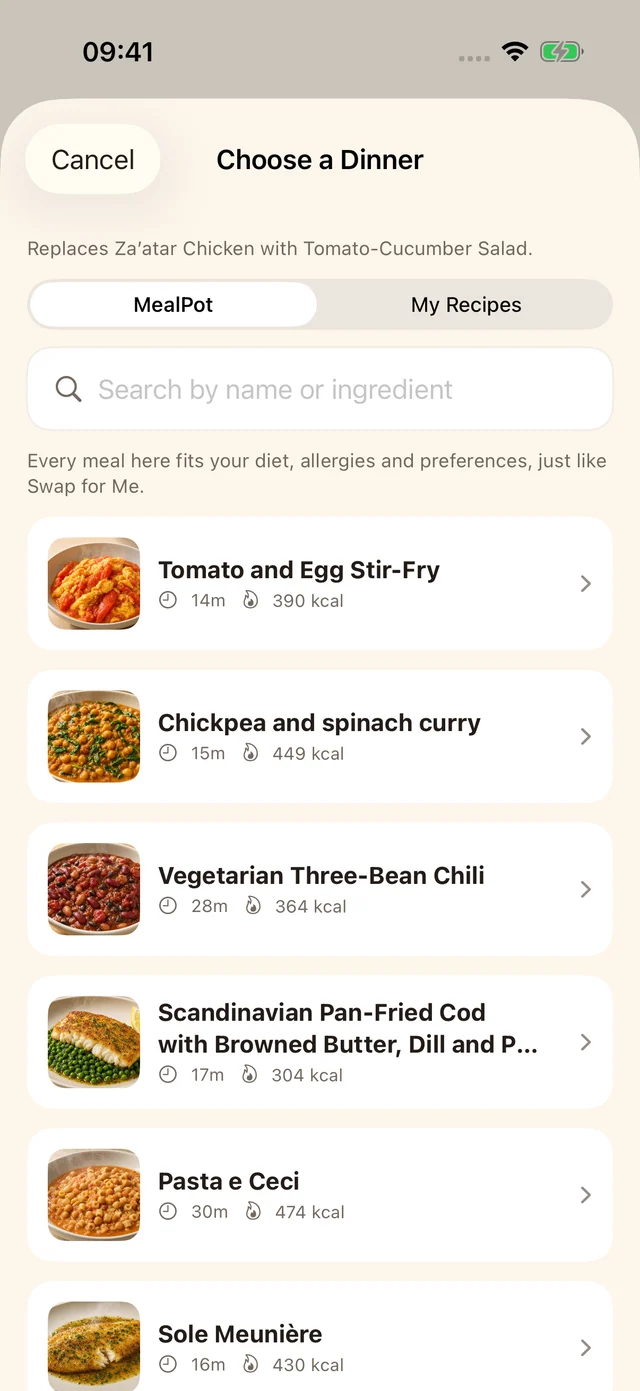
Use the preferences available in your installed MealPot version, then inspect the resulting meal plan. Mealime settings are not imported by this website’s backup tool. An individual recipe link also does not transfer an allergy profile, family member or account configuration.
Keep your written record until a week in the new app works for everyone eating the food. If an important control is missing, choose meals manually or choose a planner that supports the control you need. Our alternatives guide helps you compare the workflow before paying.
Frequently asked questions
Will my Mealime dietary preferences transfer in a recipe backup?
No. A recipe backup and your private preference settings are different records. Write the settings down and enter them in your next planner.
Can I rely on a gluten-free or allergen-free recipe label alone?
No. Check the actual ingredients, products and substitutions against your needs. A recipe label is not a product-specific guarantee.