START HERE
Copy a recipe link from Mealime, paste it into Import Recipe in MealPot, then check and save your recipe. Both short and full Mealime recipe links work. Importing requires MealPot Pro.
Watch a favourite move into MealPot.
Copy. Import. Make it yours.
Bring your favourites over one recipe at a time. Check the servings, amounts and cooking steps before saving.
Get MealPot for iPhone ↗Recipe import requires MealPot Pro.
Read the video description
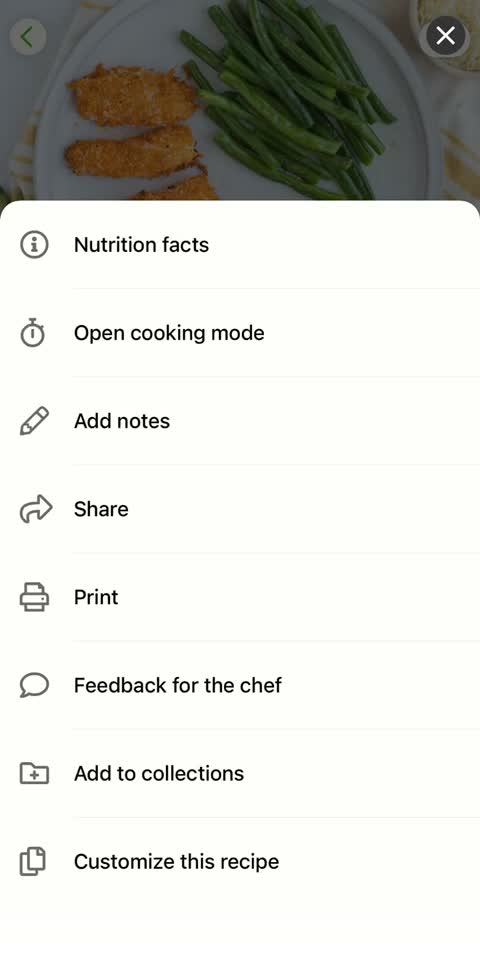
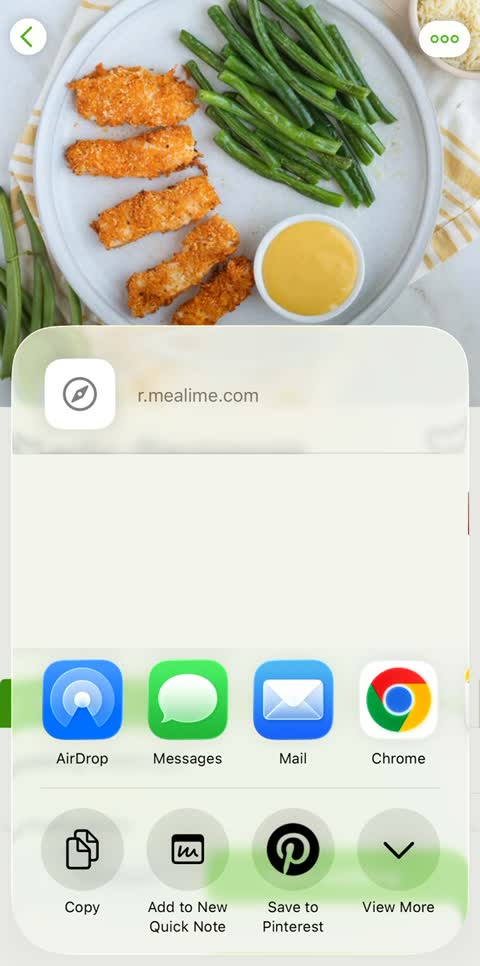
A chicken tenders recipe is opened in Mealime. Share opens the iPhone share sheet, where Copy keeps its link. In MealPot, the link is entered into Import Recipe. The recipe appears for review with two servings, 25 minutes and ingredient amounts. Save to My Recipes adds it to the Recipes tab, where it is opened again.
Just want a file to keep? Use the free recipe backup tool.
1. Copy the link from Mealime.
Open a recipe, tap the three dots in its upper-right corner, then choose Share. In the iPhone share sheet, tap Copy. Depending on your version, the wording may be “Copy URL.”

2. Import the recipe in MealPot.
- Open MealPot and go to Recipes.
- Tap + to open Import Recipe. This feature requires MealPot Pro.
- Paste your Mealime link and tap Import. Keep the screen open while the recipe is read.
- Review the title, servings, ingredient amounts and every instruction. Correct any missing information or estimated amounts before saving.
- Save, return to Recipes and open the saved recipe to check it. Add it to your plan when you are ready, then review the shopping quantities.
3. Try a recipe.
MAKE IT TONIGHT
Garlic-Parmesan Chicken Tenders with Green Beans & Honey Mustard Dip
2 servings · 25 minutes
Copy this link and paste it into MealPot’s Import Recipe screen:
https://r.mealime.com/23773
Check any amounts marked Estimated before saving.
See the original recipe ↗Prefer a file? Save a backup on the website.
Need a hand?
| What you see | What to do |
|---|---|
| The link will not open. | Copy it again from Mealime and check that the original recipe still opens in your browser. |
| Missing or estimated amounts. | Compare with Mealime’s ingredients and cooking steps. Adjust the amounts before saving. |
| The servings look wrong. | Check the original recipe and adjust the servings on the review screen. |
| Import is unavailable or you have reached a daily limit. | Keep the link and try again later. |
| You downloaded a backup. | To add the recipe to MealPot, paste its original recipe link into the app. |
Make it part of your week.
Open your saved recipe whenever you want to cook it. To add it to your plan, choose it when replacing a meal, then check your shopping list.
Keep your next week simple.
Bring a favourite, choose your meals and check your list.
Frequently asked questions
How does Mealime recipe import work in MealPot?
Copy an individual recipe link and use the Pro recipe importer in MealPot. Check the ingredients and instructions before saving. The illustrated steps above show how to get the link.
Can I save a recipe without installing MealPot?
Yes. The website backup tool creates a readable download from a supported recipe link. It does not require an account.