What is r.mealime.com?
A Mealime share action can return a short address such as r.mealime.com/23773. The short address redirects to the associated recipe. A full recipe address includes a recipe name and identifier under mealime.com/recipes/. The different-looking address does not by itself mean you copied the wrong dish.
Our importer follows supported Mealime recipe redirects and checks the destination. That support is for public recipe links, not a private favourites screen, an account link or an arbitrary website. Check the title in the preview before saving anything.
How to share a Mealime recipe link
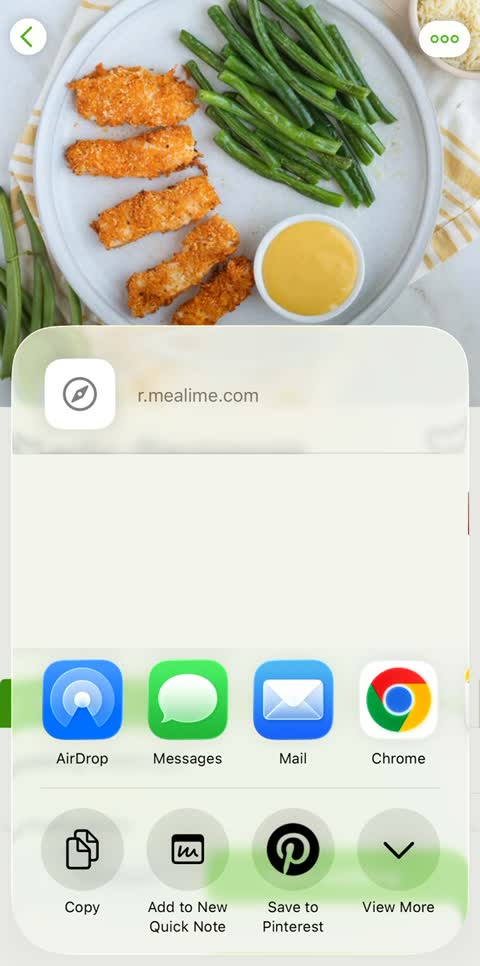
- Open the recipe you want to keep in Mealime.
- Open its more menu and choose Share.
- Select Copy in the phone’s share sheet.
- Paste the address into the recipe backup tool and request a preview.
Use the illustrated import guide for a recording of the exact controls. Sharing a grocery list or a meal plan is a different action from sharing an individual recipe. If the preview does not show a recipe, go back to the dish itself and copy its recipe link.
Check servings as well as the title
Mealime recipe addresses can represent different servings or measurement versions. Two links with the same dish name can therefore carry different amounts. Keep the link you actually intended to use, and compare the preview’s portions and quantities with the source.
A successful fetch only means the page could be read. It does not establish that every ingredient has a quantity. Check any warnings, ingredients with fractions and instructions that refer to a sauce or seasoning. Missing amounts should be resolved from the original, not quietly filled with guesses.
Will the short link work after the shutdown?
Mealime has announced its app closure for 21 October 2026. Its notice does not establish that every short link and public recipe URL will stop resolving on that day. We therefore do not describe a working share link as guaranteed to die on a specific date.
A readable backup is still useful because it does not depend on a future redirect continuing to work. Download a copy now, open it and make sure it contains the recipe you need. Keep the source link beside that copy so you can identify where it came from.
If a share link does not import
Remove accidental spaces or punctuation copied around the address and try the public link in a browser. If the recipe opens, compare the final address and try the full recipe link. If access is unavailable, use recipe text or a readable file you have already saved. Do not give the website your Mealime password.
Try a single recipe before submitting a longer list. This makes it easier to spot an invalid address or a missing amount. The troubleshooting guide separates app errors, share problems and backup-tool errors.
Using the link in MealPot
MealPot Pro offers an individual recipe-link importer. Check the route in your installed version and review the imported recipe before saving it. The website route creates a downloadable backup; its text or JSON file is not an automatic transfer into MealPot.
Neither route signs into your Mealime account or collects all private favourites. Save your notes and preferences separately, and use the switch checklist to test the new routine with a small plan.
Frequently asked questions
Does the backup tool accept r.mealime.com links?
Yes. Supported public short recipe links and full mealime.com/recipes/ addresses are accepted. Check the preview before downloading.
Does a recipe share link save my whole meal plan?
No. An individual public recipe link does not transfer your private plan, preferences, favourites or personal notes.
Why do two links for the same dish show different amounts?
They may represent different servings or unit variants. Verify the source version and the intended portions before combining ingredients.