What is Mealime?
Mealime is a meal-planning app built around choosing recipes, forming a plan and shopping for the ingredients. Its official product site and help centre describe that workflow. The announced app closure makes this a useful point to identify which parts of the routine you want to retain.
A saved recipe, a favourite, a meal plan and a grocery list are different things. Saving one recipe does not automatically save its position in this week’s plan, any private notes you added or extra grocery items you wrote yourself. That distinction matters when making a backup.
The first job: deciding what to cook
The familiar pattern is to choose preferences, browse suitable dishes and select the meals you intend to make. The useful outcome is a short set of dinners you expect to cook, not a catalogue containing thousands of recipes.
When testing a replacement, notice where your time goes. Do you enjoy selecting dishes from photographs? Would you rather place recipes you already know on a calendar? Or do you want the app to suggest a plan? These are different jobs, even when each product calls itself a meal planner.
The second job: making one usable list
Once meals and portions are chosen, the shopping step brings together ingredients. The list still needs a household check: what do you already own, what extras do you need and what pack sizes will the store sell? A convenient list should make those decisions easier to see.
Try a replacement with two recipes that share an ingredient. Check whether the resulting amount is understandable, whether raw and cooked quantities remain distinct and whether you can recognise what to buy. Our grocery-list guide focuses on this part of the transition.
Follow one dinner through the complete routine
Choose two familiar recipes for the coming days and set the household servings before building the list. Open the list alongside your cupboard and remove what you already own. Then take the remaining quantities to your usual shop, keeping household extras visible.
When you start the first dinner, check whether the recipe has the instructions and equipment information you need without returning to a search engine. Afterwards, record any adjustment worth repeating. This small exercise tests choosing, shopping, cooking and keeping a useful record together.
If something is awkward, identify the specific step. Difficulty finding meals points toward a different recipe-selection workflow; a confusing list suggests a shopping problem; losing your place while cooking suggests the recipe view needs attention. That is a more actionable comparison than deciding an app is simply good or bad.
The third job: following the method
The recipe needs to remain readable where you cook. Instructions, cookware and ingredient quantities should be easy to find together. A planner that works well at a desk can still be awkward with a phone on a kitchen counter.
Mealime documented a mobile cooking mode. When comparing another product, test its actual recipe view instead of assuming it uses the same gestures or navigation. Keep a readable backup of an important dish so your ability to cook it does not depend on learning a new interface immediately.
How that routine maps to MealPot
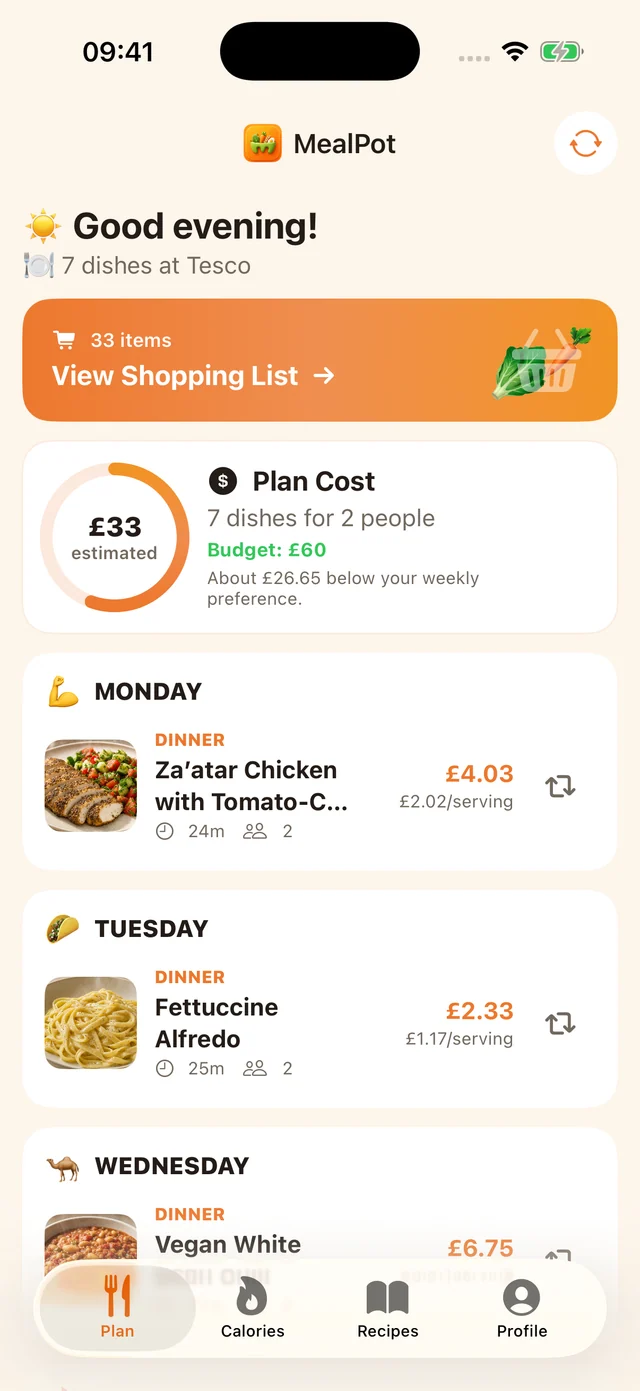
The current MealPot website shows a plan, a recipe and an organised shopping list. Its Pro recipe importer accepts an individual recipe link. The website backup tool is a separate route for making a readable copy and does not transfer an entire Mealime account.
If you are asking “does Mealime use AI?”, the documented user workflow is a better starting point than guessing the underlying technology. We do not infer a model, an agent or automatic grocery ordering from a personalised recipe list. For MealPot, compare the plan, recipe and list controls shown in the current product tour.
Choose the part of the weekly routine that matters most, then use the switch checklist to test it with one recipe and one small shop. That keeps a comparison grounded in your own cooking rather than a long list of promised features.
Frequently asked questions
What does Mealime do?
Its documented workflow connects selecting recipes, building a meal plan, shopping for ingredients and following the cooking instructions.
Does a meal-planning app automatically buy the groceries?
No. Selecting a plan is different from placing an order. Check any supported retailer handoff and review the basket before paying.