AT A GLANCE
Mealime’s official listing identifies Mealime Meal Plans Inc as the developer. Check that listing for your device, and read the closure guide before starting a new collection.
Find the official iPhone and iPad listing.
Use the Mealime App Store page linked from the developer’s services. Check compatibility, country availability and the developer name on your device. Store descriptions and older reviews can remain visible while product plans change, so read them alongside current official announcements.
Mealime’s notice announces discontinuation on 21 October 2026. If you already use it, prioritise your recipes and next week’s routine. If you are choosing a planner for the first time, invest the setup effort in a product you can continue evaluating beyond the transition.
Keep a favourite before changing the installation.
Mealime’s iOS sharing help describes opening a recipe, using More and selecting the share control. Copy an available recipe link and keep it with the title. These instructions were last updated in July 2019, so look for the equivalent share action if the interface differs.
Do this while you have a working session. Before reinstalling, replacing a phone or requesting account deletion, retain personal notes and the current list too. A phone backup and an installed icon should not be your only plan for accessing an online recipe later. Use the switch checklist to keep the records separate.
Verify a browser backup on your iPhone.
Open the free MealPot recipe backup in your browser and paste the accessible link. Inspect the preview before downloading. After saving, find the file using your browser’s download controls or the device’s file manager and open it. Check the ingredients, quantities, servings and full method.
Give the file a name you will recognise next week. If it contains only a title, a login page or partial instructions, return to the original and try a supported input such as pasted recipe text. The tool needs no account, but it cannot recover private account history or read every kind of saved file.
Check an Apple subscription independently.
For a Mealime purchase billed by Apple, open Settings, tap your name and inspect Subscriptions. The purchasing Apple Account matters, even if your Mealime email is different. Use our full cancellation guide and Apple’s official instructions if you need to stop or verify a renewal.
Keep the receipt and status for your records. A new phone, a deleted app or a fresh Mealime login is not a replacement for checking the subscription. If another provider appears on the receipt, use that provider’s route instead of assuming every iPhone user paid through Apple.
Check the features you depend on.
If you cook on an iPad, test the layout there; an iPhone screenshot does not show every tablet interaction. If another household member uses Android, test the actual shared workflow on both devices. A platform label alone does not establish shared editing, shared purchases or equal features.
Be especially careful with old integration descriptions. Mealime’s current store text mentions Health integration, while its much older tracker help says direct connections had not been built. Our nutrition guide explains this source conflict. Verify the connection in your installed version if it matters to your routine.
Try one week in the next iPhone planner.
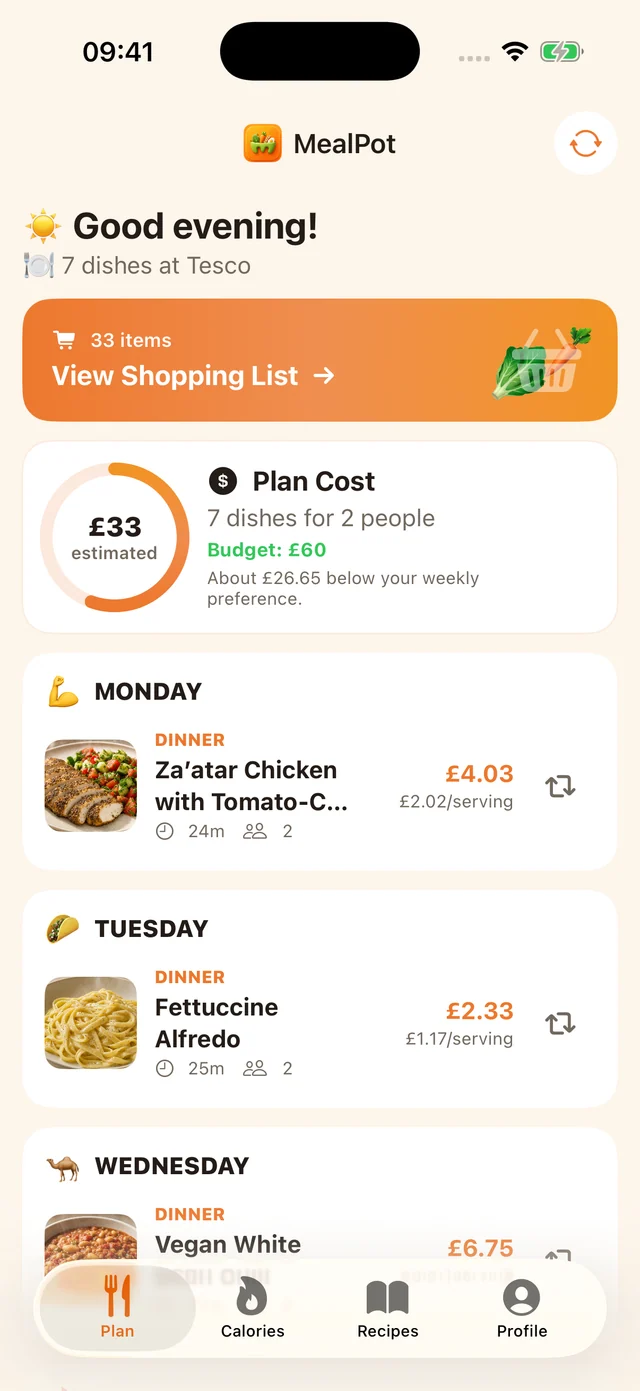
This website links to MealPot’s iPhone app. When evaluating it, start with a few regular dinners and inspect the complete grocery list. Check the current listing and purchase screen for your device and country. We do not infer native iPad, Apple Watch or Mac features from an iPhone screenshot.
If you want to bring a recipe into MealPot, individual recipe URL import is a Pro feature in the app. The website’s free backup file does not automatically import into it. Follow the import guide and compare the result with the original. You can also use the alternatives guide before settling on your next planner.
Common questions
Will keeping Mealime installed preserve the online service?
An installed app is not a guarantee that its online features continue. Keep readable copies of the recipes and notes you need.
Can I back up a Mealime recipe in Safari?
Use the website backup with an accessible recipe input, inspect the preview and verify the downloaded file on your device.
Does the free website backup add recipes to the MealPot app?
No. App import is a separate individual recipe URL workflow and is a MealPot Pro feature.
Keep the useful parts of your routine.
Save a recipe, check your copy and organise the next week.