TWO SEPARATE JOBS
A planner identifies ingredients. A retailer fulfils an order. Check the current service at your address before depending on a handoff. Mealime’s closure notice names 21 October 2026 as its discontinuation date.
Read older integration guides with their dates in mind.
Mealime’s getting-started guide, updated in 2020, describes grocery workflows for Kroger, Walmart, Amazon Fresh and Instacart. Those instructions show how the service has worked; they do not establish that every partner, feature or delivery area is available to you today.
The same guide distinguishes product selection from checkout. Its Instacart workflow includes choosing the retailer and location, then reviewing quantities after the transfer. Its Walmart instructions also ask the shopper to choose suitable products and amounts. A successful transfer therefore does not mean that every pack count is already right.
Mealime also publishes a Thrifty Foods guide, updated in October 2020. It describes opening the grocery-list menu, choosing delivery and pickup, selecting the retailer and signing in. That article explicitly tells users to verify product amounts and notes that stores differ in their available fulfilment options.
Finish the ingredient list before sending it.
Confirm the meals and serving counts first. Remove ingredients you have enough of and add the groceries your recipes do not cover. If you change the plan after starting the order, compare the new list with the basket; do not assume that the order has changed with it.
Preserve useful requirements such as drained weight, dry weight or an essential dietary specification. “One pack” can mean different amounts across brands. “Enough for 300 g dry pasta” gives you a requirement to check against the product label.
If someone else is placing the order, agree on suitable substitutions before they begin. A note such as “any suitable plain yoghurt, at least 350 g” can be helpful. An essential allergy or dietary requirement needs checking against the actual product information, including any substitute proposed later.
Check six things before paying.
| Check | What to confirm |
|---|---|
| Location | The correct address, retailer and collection point if applicable. |
| Products | The form of each ingredient and all essential product requirements. |
| Amounts | Pack size multiplied by pack count covers the recipe need. |
| Substitutions | Your preferences for unavailable products and any restrictions. |
| Fulfilment | A delivery or collection slot that fits when you need the food. |
| Total | Groceries, applicable charges and any conditions on promotions. |
For example, a list needing 600 g of an ingredient is not covered by a single 400 g product simply because its name matches. Two packs provide 800 g; now decide what to do with the remaining 200 g. The pack-size worksheet makes that extra purchase visible.
Keep any recipe cost estimate separate from the payable total. You may be buying full bottles, tubs and bags even when dinner uses only a fraction. Delivery or service charges can change the comparison again. Read the final checkout rather than treating a per-serving figure as a quote.
Locate the part of the process that failed.
If you cannot sign in to the retailer, try its official website or app directly to see whether the issue is with that account. If the basket opens but no slots appear, inspect the retailer’s current local availability. If products are missing, compare the list line by line and add suitable matches through the retailer.
Keep a readable ingredient list available while resolving the problem. It lets you shop directly or in person without reconstructing the meals. You do not need a working planner-to-retailer link to use a list of ingredients and quantities.
Keep MealPot’s planning and your checkout distinct.
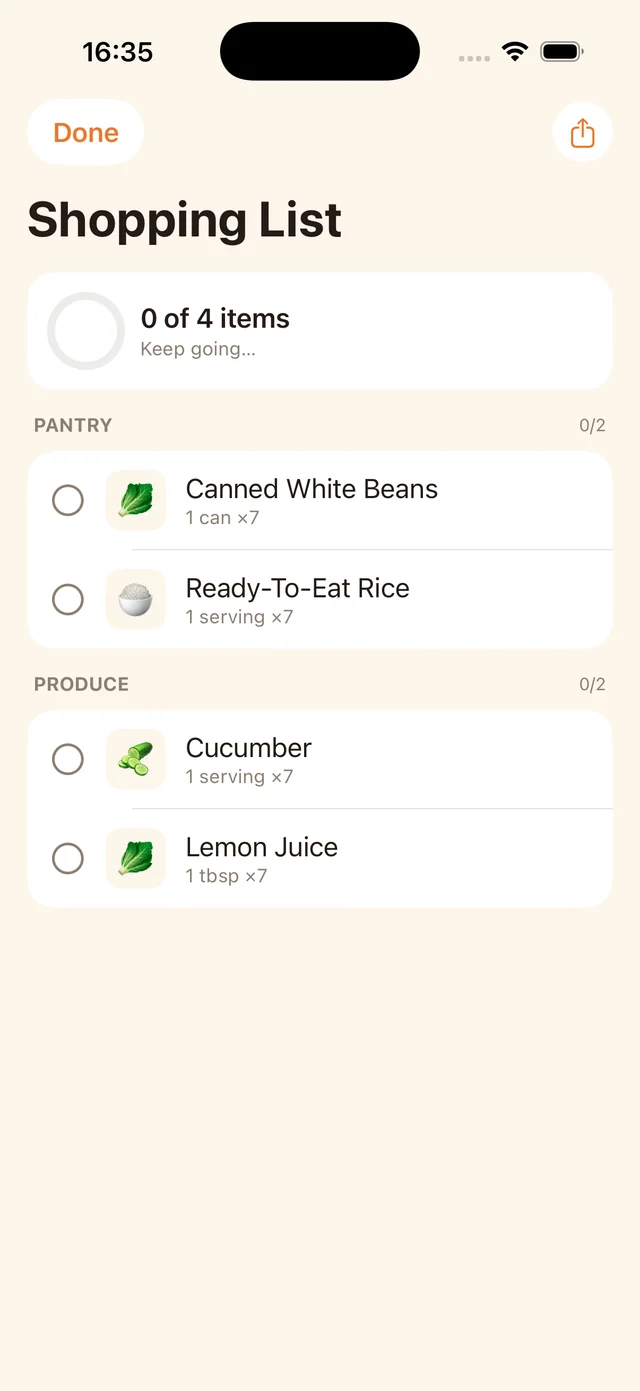
This MealPot screenshot shows ingredient groups and checkboxes. It does not depict grocery delivery, live stock or a submitted basket.
MealPot’s shopping list gives you ingredient entries to review alongside the plan. Take that list to the shop or service you choose and build the actual basket there. This page does not claim a MealPot integration with any retailer named in Mealime’s older documentation.
When switching, save your familiar recipes and record the delivery requirements that matter to you: retailer, address coverage, collection preference and acceptable fees. The website’s backup tool preserves recipe copies; it does not order groceries. Our store-agnostic guide explains how to keep the wider routine portable.
Common questions
Does Mealime work with Instacart?
Mealime’s older official guide documents an Instacart handoff. Check the option in your current account and verify retailer availability, quantities and checkout details for your location.
Does exporting a recipe send its groceries to a retailer?
No. The MealPot website backup tool creates a recipe file. Building and placing a grocery order is a separate action in your chosen shopping service.
Can I shop without a grocery integration?
Yes. Use a readable ingredient list to select products directly online or in a shop, checking packs and quantities yourself.