PLAN, THEN REVIEW
Choose meals, check their ingredients and portions, then review the grocery list. Editing the meals can rebuild that list. Mealime’s official announcement says it will be discontinued on 21 October 2026.
How Mealime documents building a plan.
The official plan-building article, updated in July 2019, describes starting from New on the Meal Plan screen, adding recipes with the plus control, reviewing the meal selection and choosing Build this Meal Plan. It says completing that process populates the grocery list.
Mealime’s newer 2020 getting-started guide describes both choosing recipes yourself and using an automatic plan builder. It also explains that you can start with selected recipes and let the builder suggest the remainder. Those are documented planning approaches; the wording and placement of controls in your current app may differ.
Choose the approach that handles your actual difficulty. If deciding dinner is the hard part, start with a small suggested selection. If you already have three dishes in mind, use those. Neither approach requires you to fill every evening merely because the planner offers space.
Open the recipe before committing to its photo.
Mealime’s preview guide describes tapping a recipe in the mobile planner to inspect cookware, ingredients and instructions. The 2019 article distinguishes mobile preview from the web experience, so check what your current interface offers instead of assuming every platform is identical.
Use that inspection to answer practical questions. Do you own the cookware? Is an ingredient unfamiliar or difficult to find? Does the method require several things to happen at once? A short headline time may still come with preparation and washing-up that do not fit your evening.
Compare the recipes with one another too. Two meals may share a useful ingredient, but three dishes that each require a different opened sauce can leave several remainders. Check pack sizes and second uses while changing the plan is still easy.
Know what changes when you edit a plan.
Mealime’s editing instructions describe More → Edit this plan, followed by a confirmation before modifying the selection. They explain that generated grocery entries are replaced, custom additions transfer and completed items may need checking off again.
This matters most after shopping has started. Suppose you remove a pepper dish but another dinner still needs one pepper. The updated list needs to account for that remaining meal and what you have already purchased. Inspect the result rather than crossing out every ingredient associated with the removed dish.
If you have bought all the ingredients, an easier change may be moving when you cook a meal rather than replacing it. Check storage instructions and dates before postponing food. A plan is a decision aid; keeping its calendar tidy is not more important than managing what is already in the kitchen.
Save the decisions an account transfer may not preserve.
Write down the small amount of information that makes next week easier: regular dinner names, your usual servings, ingredients you avoid and which evenings need the simplest meals. Keep readable copies of favourites through the recipe backup tool, checking each recipe before relying on it.
| Keep a note of | Why it helps next week |
|---|---|
| Three reliable dinners | You can test the new planner without also learning new recipes. |
| Servings for each dinner | The grocery list can reflect actual eaters and planned extra portions. |
| A busy-night fallback | An evening change does not require a fresh recipe search. |
| Ingredients already bought | The replacement plan can use what is actually available. |
Do not assume that a saved recipe file also contains your plan history, favourite status or account preferences. Backing up content and setting up a new planning routine are related jobs, but completing one does not automatically complete the other.
Try a small MealPot plan with familiar food.
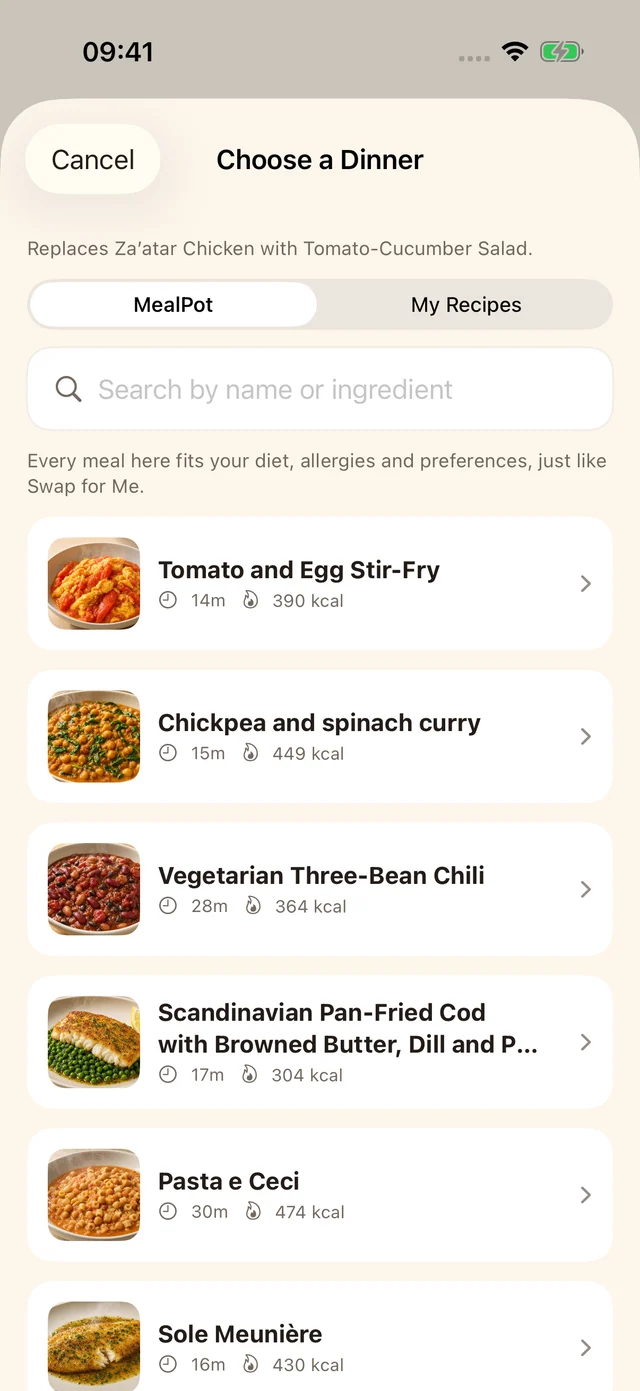
This MealPot screenshot shows the dinner chooser for replacing a planned meal. Inspect the chosen recipe and shopping list after the change.
MealPot supports suggested meals and dinner swaps with a shopping list alongside the plan. Try a few meals, replace one that does not suit the evening and check whether the resulting plan is easy for your household to follow. Use the list to assess the whole routine, not only whether the recipe photo looks appealing.
Our practical weekly planning guide focuses on the evenings you have rather than app controls. If a full week feels demanding, try the small three-dinner routine. You can compare other planning approaches through the alternatives guide.
Common questions
Can I change a Mealime plan after building it?
Its official editing guide describes adding and removing recipes from an existing plan. Review the regenerated grocery list and any completed items afterwards.
Do I have to plan a full week?
You can choose a small set of meals that fits the next few evenings. Keep room for a fallback and existing plans rather than adding dinners you do not expect to cook.
Will a recipe backup preserve my entire meal-plan history?
No. The website backup tool preserves recipe content. Record any meal-plan details or preferences you want to keep separately.
Keep the shop in step with the plan.
Check the grocery-list workflow after making a change.