KEEP THESE TOGETHER
A recipe’s ingredients only make sense alongside their serving count and units. Preserve all three. Mealime’s official announcement gives 21 October 2026 as its discontinuation date.
What Mealime documents about servings.
The support article titled “Can I scale servings greater than 4?” says meals can be adjusted to six servings through eating preferences. It was last updated in May 2020. The article’s title therefore does not mean that four is the documented maximum; its body describes six.
That older page says larger households need manual quantity adjustments. Treat its reference to possible future expansion as a historical statement, not evidence of a feature that shipped. Check the choices shown in your own app before planning a larger batch around them.
Decide the intended servings for each meal rather than relying only on your household default. A dinner for two plus one planned lunch needs three portions. An evening when someone is away might need fewer. Put those choices in the plan before combining groceries.
Changing units is different from changing portions.
Mealime’s unit-setting guide describes Settings → Eating Preferences → Metric / US. It says the change takes effect when you create a new meal plan. The 2019 article also explains that its metric presentation is adapted for Canada and can still use cups or tablespoons.
If a recipe still displays a cup measurement after choosing metric, that alone does not prove the setting failed. Check the documented behaviour and the actual ingredient. A unit preference does not guarantee that every volume becomes a gram weight.
Keep the unit attached when copying a quantity. A cup of one ingredient does not weigh the same as a cup of another. Use a reliable ingredient-specific conversion if one is needed, or keep the original measurement rather than supplying a guessed weight.
Scale an ingredient list with one clear multiplier.
Divide the portions you want by the original portions. For a four-serving recipe becoming dinner for three, the multiplier is 3 ÷ 4 = 0.75. The following example shows ingredient arithmetic, not a complete cooking method.
| Ingredient | Original amount | Three-serving amount |
|---|---|---|
| Dry pasta | 400 g | 300 g |
| Chopped tomatoes | 600 g | 450 g |
| Peas | 200 g | 150 g |
Do the same check for a dressing or sauce listed separately. Keep “to taste” as a judgement instruction and investigate any missing amount in the source. An imported blank is not an invitation to generate a precise-looking number.
Cooking time, temperature and pan capacity need their own review. They do not use a simple serving multiplier. A larger batch may crowd the pan or need separate batches. For baking and other methods sensitive to ratios and vessel size, choose a tested version suited to the intended yield. Our full scaling guide explains the practical checks.
Inspect what your backup actually contains.
Open the original recipe beside the saved copy. Compare the title, serving count, measured ingredients and every cooking step. Look for instructions that mention an amount inside the prose; that figure may need attention even when the ingredient list looks correct.
Keep original yield information when the desired yield is different. A note such as “source serves four; cooking three portions” gives you a way to check the calculation later. Avoid a copy that says “three servings” above ingredients still intended for four.
Then build the grocery requirement from the adjusted recipes. If two dishes together need 450 g of pasta, a 500 g purchase may cover them, but that does not change either dish’s ingredient amount. Read the pack-size guide before treating a shopping quantity as a cooking quantity.
Test one recipe before moving the whole routine.
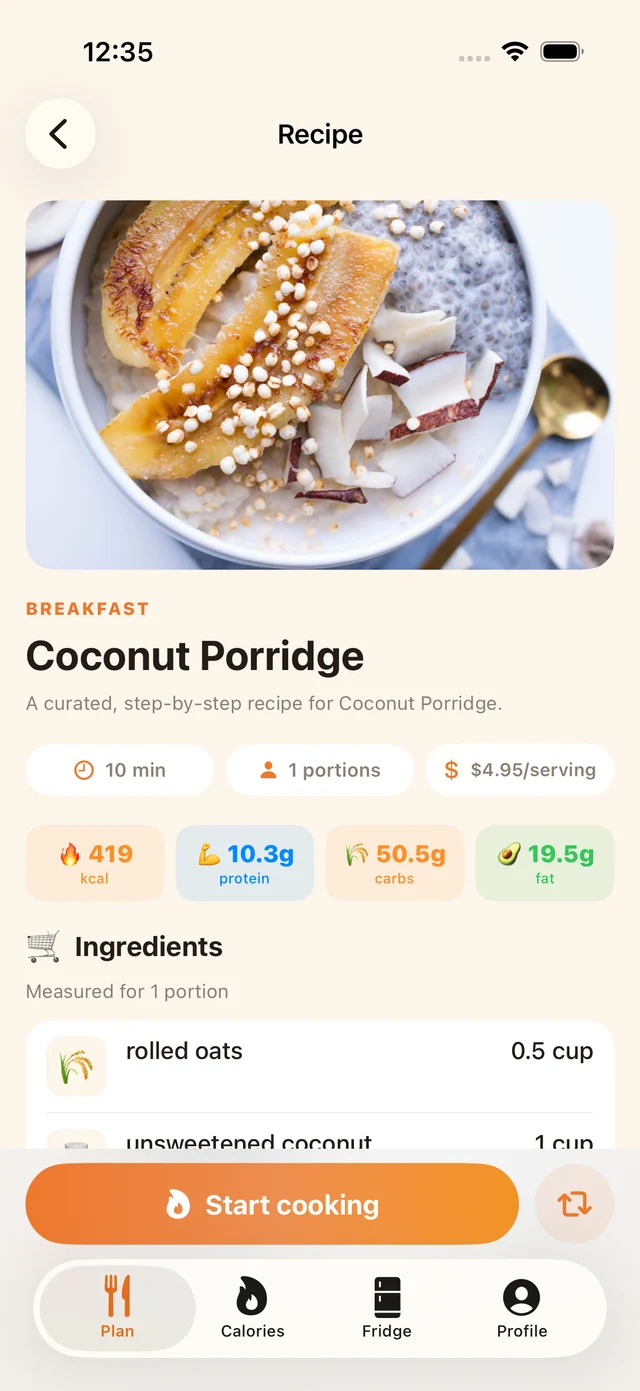
This MealPot example labels the ingredients for one portion. Its displayed price is an app example, not a verified grocery bill.
MealPot recipe details show the portion context alongside ingredients. When trying your next plan, inspect a familiar dish and compare it with your checked copy. Verify the amounts you intend to cook and the resulting shopping entries, rather than assuming that a successful save proves every quantity is right.
The website’s backup tool creates readable recipe copies. MealPot’s in-app recipe-link import is a separate Pro workflow; a website backup file is not a promise of automatic app import. Keep the original until the route you use has produced a copy you have checked.
Common questions
Does Mealime support more than four servings?
Its serving support article, updated in May 2020, documents up to six through eating preferences. Check the current choices in your account rather than relying on the older article title alone.
Why does Mealime still show cups in metric mode?
Mealime’s unit guide says its Canadian-oriented metric system may retain cups and tablespoons. It also says preference changes apply to newly created plans.
Can I double the timer when I double the portions?
No. Review the cooking method, vessel and appropriate doneness guidance. Ingredient arithmetic does not determine the timer.